The weight prediction feature in AgroVision Growers estimates the expected weight of animals based on a predefined growth curve. The prediction helps you monitor growth performance and compare actual results with expected weight development over time.
You can view, create and manage growth curves in the "Settings" under "Site Information"
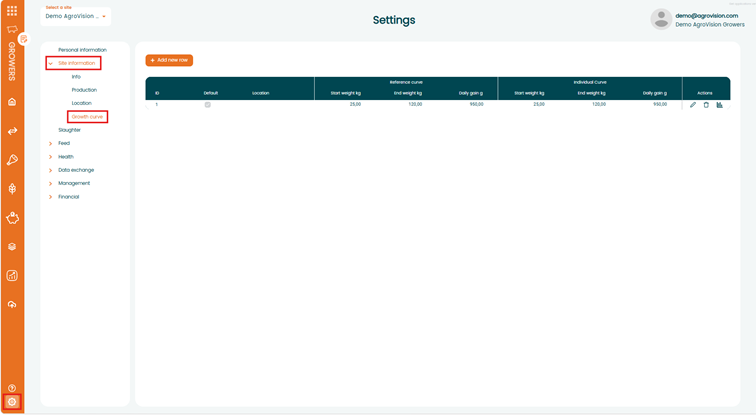
By default, the growth curve starts at 25kg with a daily gain of 950g and an end weight of 125kg.
The growth curve marked with the Default checkmark (✓) is automatically used for all locations and batches unless another growth curve has been specifically assigned.
Note: If no specific growth curve has been assigned, the system automatically uses the default growth curve.
It is possible to change the growth curve to an individual curve by changing the start weight, end weight and the daily gain. You can also create multiple growth curves e.g. for different locations or batches.

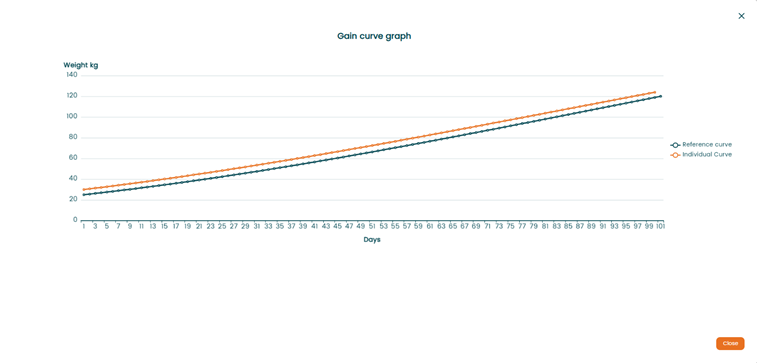
In the Actions column you can click on the graph icon to see the reference growth curve compared to any custom growth curve. This provides a visual overview of the expected growth progression.

If you want to use different growth curves at specific location you only need to select the location within an existing curve or create a new one.

Note: Growth curves can only be assigned at the barn level. Each location can only have one assigned growth curve.
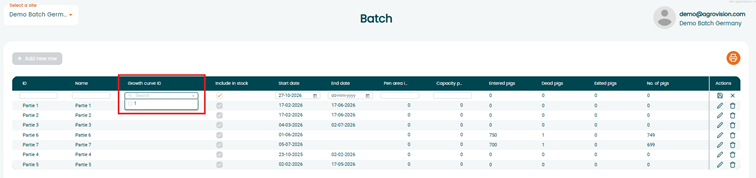
To assign a specific growth curve to a batch you simply need to add the ID during the batch setup.