
The Medicine report helps you track and analyze treatments and medicine usage across your sites. By reviewing this report, you can monitor which animals received treatments and analyze medicine consumption over time.
Navigate to the "Report" menu and choose the "Medicine report". The report will open in a new tab.
Select the timeframe you wish to include in the report and choose a site. You have the option to pick a "User defined" period from the "Period selector". If you select "User defined," you can choose up to 6 periods, sites, and barns for your report. Click on "Get reports" once you are finished.
If no barns are selected, all barns will be accounted for in the report.
When you click on "Advanced selections", a screen will appear that enables the selection of specific medicines and diagnoses. This can be done for each period.
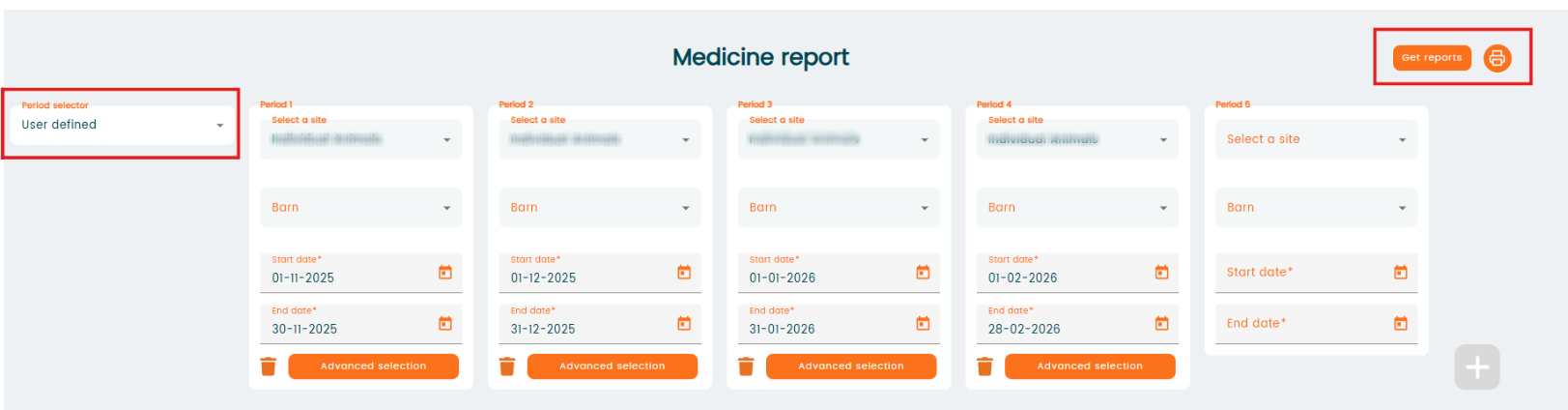
You can also choose a period from the list in "Period selector" and select one site and one barn. The last column always shows the total for the period. Advanced selections will apply for the whole report.

Select "Get reports" and the report will open in a new tab.
The "Medicine report comes from a series of treatments and individual treatment events. A treatment series can include multiple treatment sessions over time.
Report calculations are based on the following:
- For reporting purposes, an animal counts as "treated" once the first treatment instance has been entered
- The first treatment is relevant for choosing in which period the treatment should be shown. Only show treatments in a period when the first treatment of a series is entered in this period.
- This applies for completed treatments, stopped treatments and unfinished treatments.
- Treatment instances will be shown based on their individual date.
- Treated diagnosis should behave in the same way as treatments themselves, so the first treatment entered for a specific diagnosis determines which period the diagnosis belongs to.
- Medicine usage will be included based on the date of the treatment, so for one treatment cycle the used medicine can be spread between multiple periods.