
It is possible to see all active animals in a location. Setting the capacity for each location allows you to see how many animals are currently in a pen and how much space is still available. This helps prevent overcrowding and makes it easier to plan relocations and manage animals efficiently. Before this is possible, you need to add the capacity for each location.
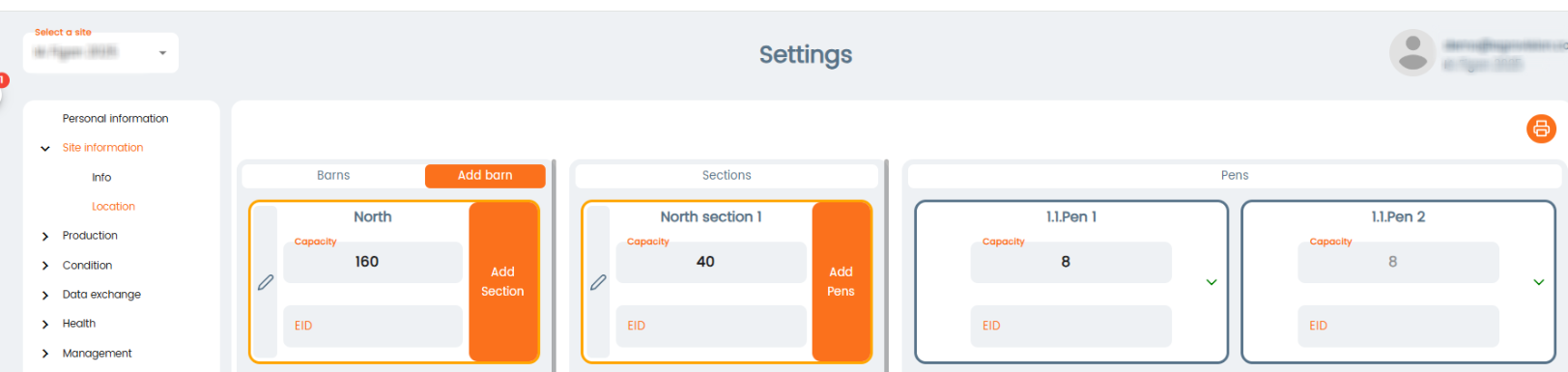
To configure this, go to "Settings" - "Site information" - "Location".
On pen level, simply write how much capacity is available. Remember to press save for each pen. The capacity for each pen is automatically added up in the capacity field for the section and then in the capacity field for the barn (depending on amount of sections).
Go to "Animal events" - "Relocation". Click on "Group registration" icon.

Start by clicking the "+Add new row" icon to register a relocation.
Once you choose a location, a dropdown menu for the locations appear. Here, it is possible to see how much capacity is left in each location.
